Power BI costs
Power BI Pro cost per user: calculate what you save
Power BI Pro costs €12.10 per user per month. The DigiData platform costs €95 a month, however many colleagues are viewing. You pay for the connection to your source separately with both: a connector with Power BI, an integration with DigiData.
14 days free · no start-up costs · cancel monthly
Calculate your saving
What you pay to get the data out of your software.
From €50 per integration. Leave at 0 with your own database.
DigiData is cheaper from 7 users.
Amounts exclude VAT, both on annual billing. The DigiData platform costs €95 a month; on annual billing you pay 10 months. Microsoft prices checked on 5 October 2026. Hours for building and administration are not included.
What does Power BI cost per user?
Power BI Pro costs €12.10 per user per month and Premium Per User €20.80, billed annually and excluding VAT (Microsoft's euro price list, checked on 5 October 2026). In a shared workspace everyone who publishes or views reports needs one of these licences. With 25 users that is €3,630 a year in Pro licences. The DigiData platform costs €95 a month, or €950 a year on annual billing, however many people are viewing. The connection to your source comes on top on both sides: a connector with Power BI, and from €50 a month per integration with DigiData.
What you get
What you pay for with DigiData
Two fixed items per month. The number of users is not one of them.
Platform
€95 a month for the platform: dashboards, AI agent, OData feed and automatic syncing.
Per integration
From €50 a month per connected source, such as Exact Online or Twinfield. This replaces the connector or data platform you buy separately for Power BI.
Own database: the platform only
Is your data already in your own PostgreSQL or SQL Server database? Then you need no integration and pay for the platform only: €95 a month, or €950 a year on annual billing.
No cost per user
Builders and viewers do not count towards the price, and neither does your accountant or a client with a read-only link.
Monthly or annual
Cancel monthly, and the first 14 days are free. If you choose annual billing, you pay 10 months for 12 months of use.
AI by usage
If your team asks the AI agent a lot of questions, you choose a larger AI package. That depends on the number of questions, not on the number of users.
Count who is viewing
Count builders and viewers. In a shared workspace, people who only view need a paid licence too.
Put the data source on both sides
With Power BI that is the connector to your accounting or CRM software, with DigiData the integration. With your own database that item disappears on both sides.
Put the fixed amount next to it
With DigiData that is the platform plus your integrations. On the pricing page you put together the amount for your sources.
What you replace
The integration replaces the connector Power BI needs separately
Power BI shows data, but it does not get that data out of your accounting or CRM software itself. A second platform sits in between, with its own bill. With DigiData that is the same product. This is what the price per integration covers.
Open the live example- Fetching data from your accounting, CRM or project software
- Storing it and refreshing it automatically, from hourly to weekly
- Daily backups of the synced data
- An OData feed for Power BI and Excel, if you want to keep using them
- One supplier and one invoice for data and dashboards
With Power BI you add the hours for the data model, DAX and administration, and a licence for every colleague who wants to view.
Worked example
Dashboard costs per year as the team grows
Power BI licences against the DigiData platform, both on annual billing. The connection to your source is left out on both sides: with Power BI the connector comes on top, with DigiData from €50 a month per integration.
| Users | Power BI Pro, licences | Premium Per User, licences | DigiData, platform |
|---|---|---|---|
| 5 | €726 | €1,248 | €950 |
| 10 | €1,452 | €2,496 | €950 |
| 25 | €3,630 | €6,240 | €950 |
| 50 | €7,260 | €12,480 | €950 |
| 100 | €14,520 | €24,960 | €950 |
For a small team Power BI is cheaper: with Pro the break-even point is at 7 users. On annual billing you pay DigiData for 10 months, so 10 times €95. Enter your connector and your integrations in the calculator for the total. All amounts exclude VAT.
What you get for it
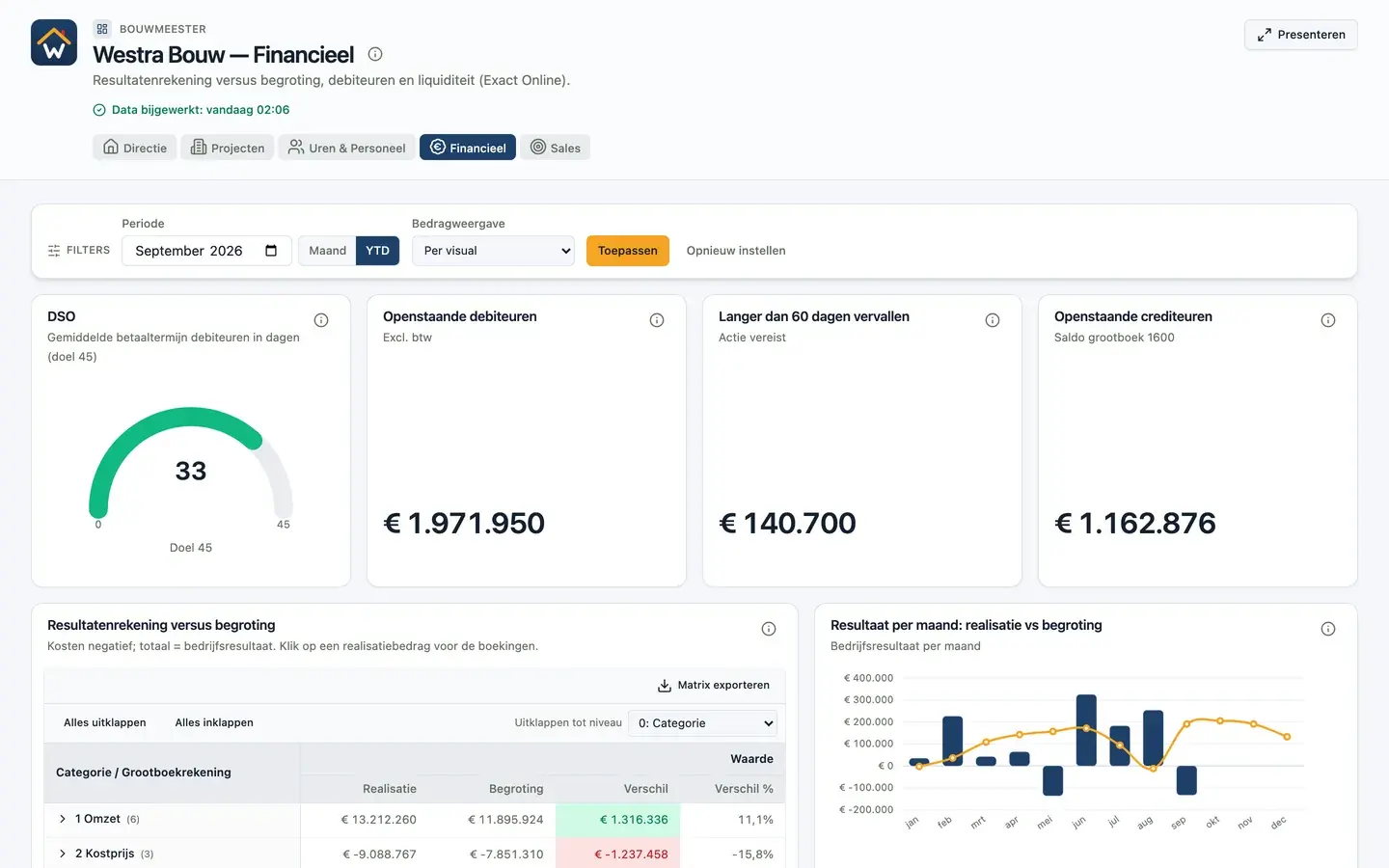
This is the dashboard you share with the whole team
The example of the fictional Westra Bouw runs on connected accounting data. Everyone with access can view, filter and click through to the entry behind a figure, without a licence of their own.
What does Power BI Pro cost per user?
€12.10 per user per month, billed annually and excluding VAT. Premium Per User costs €20.80. These are the euro prices on Microsoft's pricing page on 5 October 2026.
Do viewers need a licence too?
In a shared workspace they do: anyone who views a colleague's report needs Pro or Premium Per User. Viewers with a free licence can only view when the report is on Fabric capacity from F64 or on Power BI Premium capacity.
When is Power BI cheaper than DigiData?
With a small team. With Power BI Pro the break-even point is at 7 users: below that the licences cost less than the DigiData platform at €950 a year. The connection to your source comes on top on both sides. If Power BI Pro is already part of your Microsoft 365 E5 subscription, or you have Fabric capacity from F64, the comparison also turns out differently.
Why is the integration not part of the comparison?
Because you pay for it separately on both sides. Power BI needs a connector to reach the data, DigiData an integration. The comparison is therefore about the dashboards themselves: licences per user against the fixed platform amount. In the calculator you enter both for the total.
Do I still need a connector with Power BI?
Usually, yes. For a lot of business software, such as Exact Online, Power BI has no built-in connector. You then need a connector or data platform that fetches, stores and refreshes the data, and you pay for it on top of the licences. With DigiData that is the integration itself: the amount per integration replaces that connector.
Do you compare annual or monthly prices?
Annual prices, for both. Microsoft shows the price per user with annual billing. For DigiData we therefore also use annual billing: you pay 10 months for 12 months of use, so €950 a year for the platform instead of 12 times €95. If you prefer to pay DigiData monthly, you can cancel every month.
What does DigiData cost if my data is already in my own database?
Then you pay for the platform only: €95 a month, or €950 a year on annual billing. You connect your PostgreSQL or SQL Server database read-only and need no integration per source.
Do I really pay nothing per user with DigiData?
Correct. You pay for the platform and per active integration. Builders, viewers and people you share a link with do not count.
I already use DigiData as the connector for Power BI. What changes?
Nothing about your subscription. The same data is already in DigiData, so you can build dashboards there or have your Power BI report moved across. You can cancel the licences of anyone who no longer needs to view in Power BI.
Are the hours for moving reports part of the comparison?
No. The calculator compares recurring costs. The AI agent moves existing reports across from a Power BI project. Do allow time to review the proposal and compare the figures side by side.
14 days free · no start-up costs
Want the comparison for your situation?
Tell us which sources you use and how many people view. We work through the numbers with you in a demo.
