HR dashboard
An HR dashboard on your own payroll and time data
See how many people are employed, how high absence is, how much leave is outstanding and how productive the workforce is. DigiData builds the HR dashboard with AI on Nmbrs, Exact Online or Simplicate and puts it next to your hours and revenue.
14 days free · no start-up costs · cancel monthly
What is an HR dashboard?
An HR dashboard is an overview of an organisation's key workforce figures, such as headcount and FTE, joiners and leavers, absence rate, leave and productivity. It pulls the data from payroll or HR administration and time tracking, and sets each figure next to a norm or the previous period. Leadership and HR see where absence is rising or staffing is getting tight, without merging lists from different systems.
What you get
From separate HR lists to one overview
The same dashboard for leadership, team leads and HR.
Absence against a norm
See the absence rate per month and department next to your own norm, and click through to open cases.
Headcount and FTE
Employees, FTE and contracts ending soon, straight from payroll.
Leave
Requested and approved leave per department, so busy periods and tight staffing show up in advance.
Hours next to staff
Combine contract hours from payroll with logged hours from time tracking and see how much time is productive.
Filter by department
One dashboard for the whole organisation, with filters that narrow it to a department or role in one click.
Monthly overview in your inbox
Schedule an email with last month's absence, or an alert as soon as absence goes above your norm.
How it works
How to build an HR dashboard
No payroll exports and no Excel list per department.
Connect your sources
Connect your payroll or HR administration, such as Nmbrs or Exact Online, and optionally your time tracking. DigiData syncs the data automatically, from hourly to weekly.
Agree the definitions
Decide how you calculate absence, FTE and productivity, and which norm applies. Dashboards, the AI agent and email reports then all calculate with the same measurements.
Describe your dashboard
Ask for example for the absence rate per month and department, current headcount and contracts ending soon. The AI agent builds the first version and you adjust widgets, filters and colours in the visual editor.
Live example
What is on this HR dashboard?
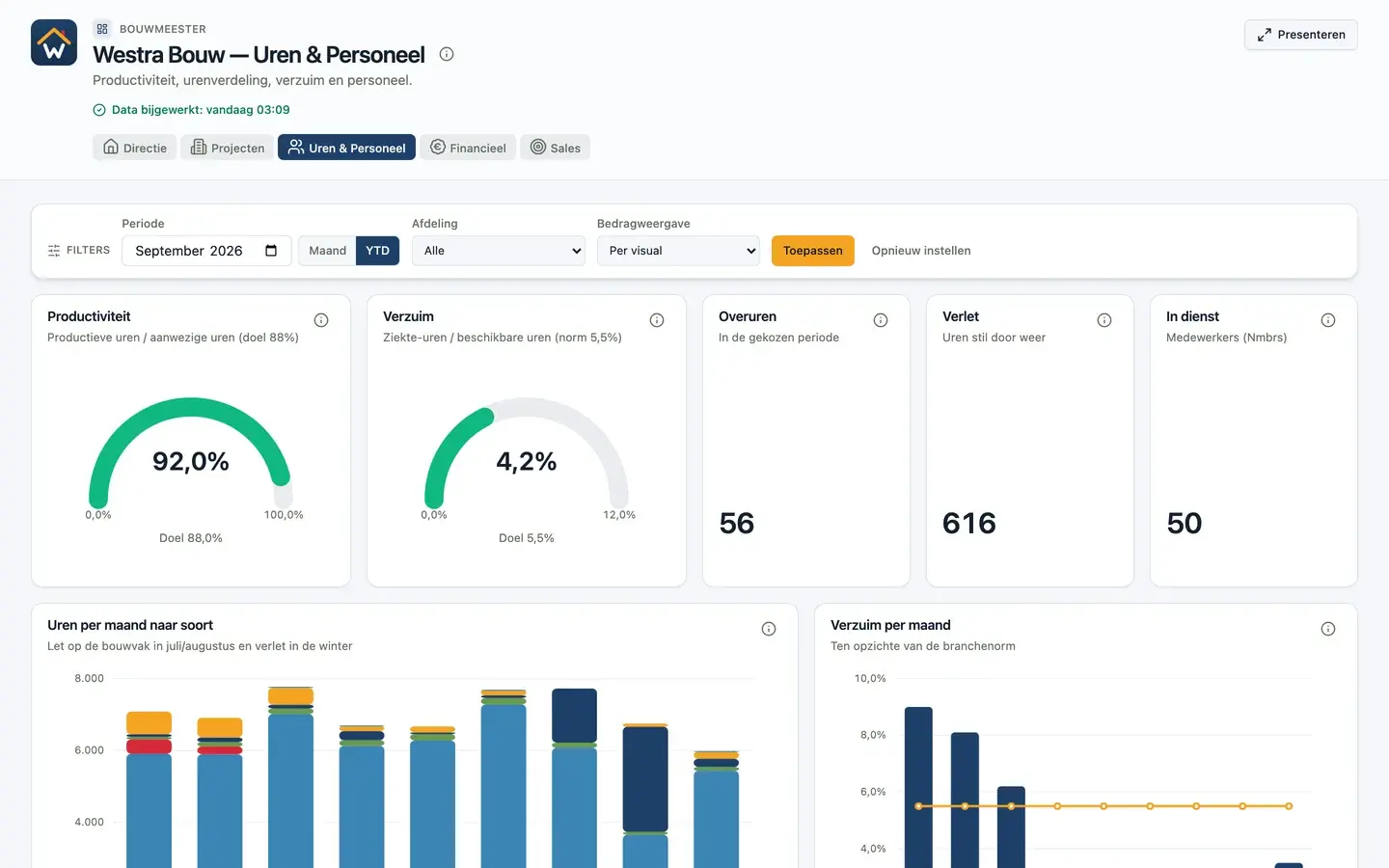
The hours and staff dashboard of the fictional Westra Bouw, a construction company with 50 employees. Open it and click through yourself.
Open the live example- Productivity: productive hours divided by hours present, against an 88% target
- Absence: sick hours divided by available hours, against a 5.5% norm
- Overtime, weather downtime and headcount
- Hours per month by type, including the summer holiday and winter downtime
- Productive hours per department and employee
- Open absence cases
Source in the demo: time tracking shaped like Exact Bouw and payroll shaped like Nmbrs.
More dashboards
All about building dashboards with AIFinancial dashboard
Result against budget, DSO and receivables on your accounting data.
KPI dashboard
The key figures you steer on, each with a target or comparison.
Management dashboard
Revenue, result, margin and pipeline in one overview for leadership.
Sales dashboard
Quarterly target, win rate, pipeline and funnel on your CRM data.
Project dashboard
Project margin, order book, hours and progress per project.
Custom dashboards
Let AI build the dashboard, or build the first set together with us.
Power BI dashboard
What you need for a Power BI dashboard, and the alternative.
Which KPIs belong on an HR dashboard?
Headcount and FTE, joiners and leavers, absence rate and absence frequency, outstanding leave, contracts ending soon and, if you track time, productivity. Put each figure next to a norm or the previous period.
How do you calculate the absence rate?
Divide the hours or days lost to absence by the available hours or days in the same period and multiply by 100. Use contract hours as available time and pro-rate part-timers. Fix the definition once, so the dashboard and the monthly email show the same number.
How do you calculate FTE?
Divide weekly contract hours by your organisation's full-time standard, for example 38 or 40 hours. Someone on 32 hours with a 40-hour standard is 0.8 FTE. Add up the FTE of all employees for total staffing.
Which systems does the HR dashboard work with?
DigiData connects to Nmbrs, Exact Online and Simplicate, among others, for employees, contracts, leave and absence. The tables available per connector are listed on the integration page.
14 days free · no start-up costs
Your own workforce figures in a dashboard?
We connect your payroll and show your own headcount and absence in a demo.
