Project dashboard
A project dashboard with margin, hours and progress
See which projects make money, which ones leak margin and how much work is still in the order book. DigiData builds the project dashboard with AI on Exact Bouw, Robaws, Simplicate or OutSmart, combined with your accounting data.
14 days free · no start-up costs · cancel monthly
What is a project dashboard?
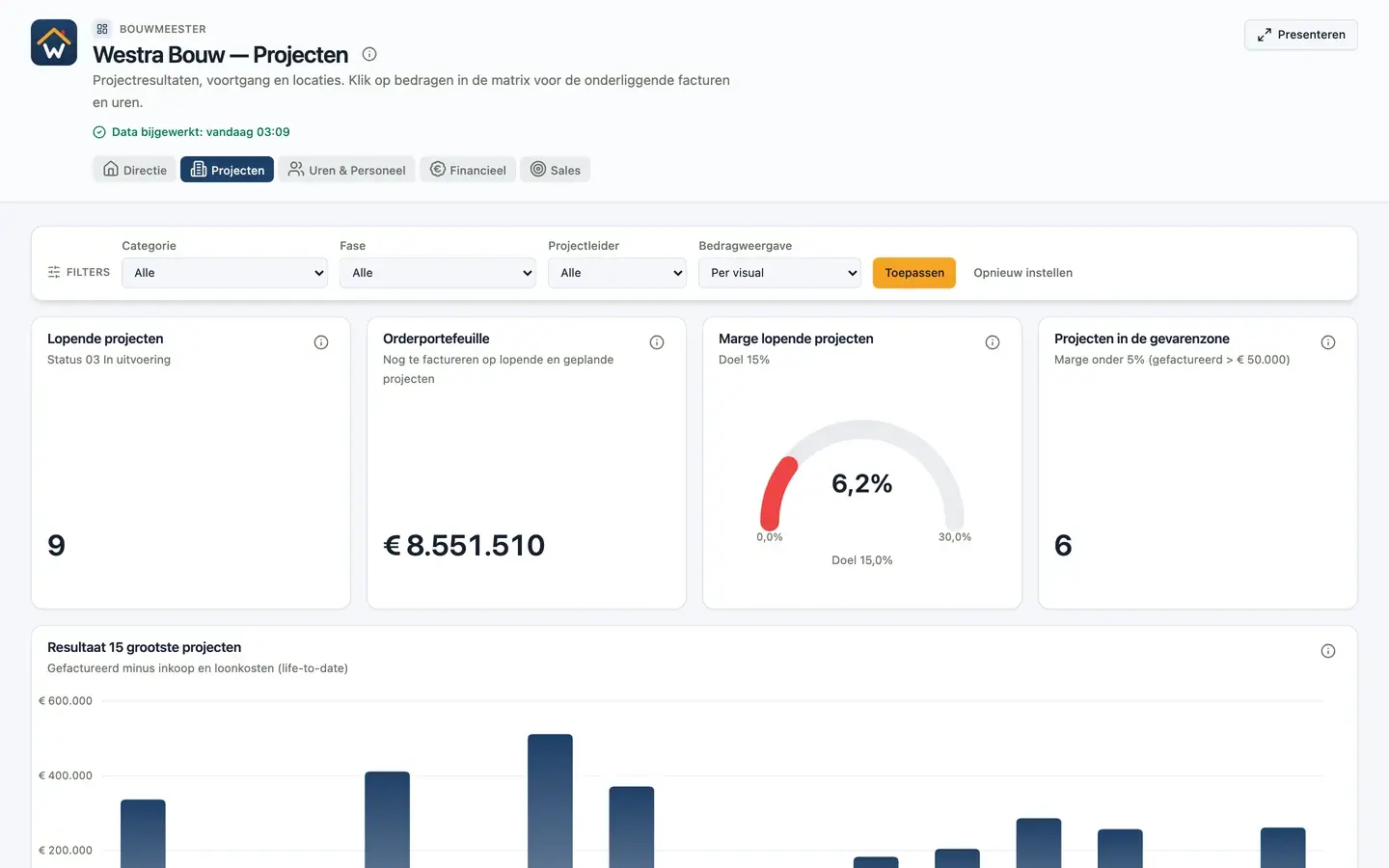
A project dashboard is an overview of all running projects showing margin, hours spent against the estimate, progress and invoicing per project. It combines project software with accounting and shows project managers and leadership which projects need attention while they are still running.
What you get
Adjust while the project is still running
Job costing that does not wait for handover.
Estimate against actuals
Set budgeted hours, materials and costs next to the actual bookings and see per project where the gap opens up.
Projects in the danger zone
A separate tile shows the projects whose margin drops below a limit, so they do not disappear among the rest.
From project to invoice and hour
Click a project to see the invoices, purchases and logged hours behind it. No separate export per project.
Filter by project manager
Filters on category, phase and project manager turn one dashboard into an overview per team.
One slide per project category
In presentation mode a page repeats per project, team or category. Useful for the project meeting.
Projects on the map
Show project locations on a map next to the figures, for planning and regional overviews.
How it works
How to build a project dashboard
Project software and accounting in one overview.
Connect your sources
Connect your project software, such as Exact Bouw, Robaws, Simplicate or OutSmart, and your accounting system. DigiData syncs the data automatically, from hourly to weekly.
Agree the definitions
Decide how project margin is calculated and which costs and hours count. Dashboards, the AI agent and email reports then all calculate with the same measurements.
Describe your dashboard
Ask, for example, for margin per project, the order book and projects with a margin below 5%. The AI agent builds the first version and you adjust widgets, filters and colours in the visual editor.
Live example
What is on this project dashboard?
The project dashboard of the fictional Westra Bouw runs on sample data shaped like Exact Bouw and Exact Online. Open it and click through yourself.
Open the live example- Running projects and order book
- Project margin against a 15% target
- Projects in the danger zone: margin below 5%
- Result of the 15 largest projects
- Project result per category, with click-through to invoices and hours
- Progress against margin and a map of project locations
Sources in the demo: project software (Exact Bouw) and accounting (Exact Online).
More dashboards
All about building dashboards with AIFinancial dashboard
Result against budget, DSO and receivables on your accounting data.
KPI dashboard
The key figures you steer on, each with a target or comparison.
Management dashboard
Revenue, result, margin and pipeline in one overview for leadership.
Sales dashboard
Quarterly target, win rate, pipeline and funnel on your CRM data.
Custom dashboards
Let AI build the dashboard, or build the first set together with us.
Power BI dashboard
What you need for a Power BI dashboard, and the alternative.
What goes on a project dashboard?
Per project: margin, hours spent against the estimate, progress, invoicing and work in progress. Above that the totals: number of running projects, order book and average margin against target.
Which project software does the project dashboard work with?
DigiData has connectors for Exact Bouw, Robaws, Simplicate, OutSmart and ClickUp, among others. The tables available per connector are on the integrations page.
Can I track project margin while the project is running?
Yes. The dashboard refreshes automatically with the latest hours, purchases and invoices. You see during delivery whether a project deviates from the estimate, not only at final costing.
Can I combine hours from project software with costs from accounting?
Yes. DigiData puts both sources in one data layer, so logged hours and booked costs per project sit side by side.
14 days free · no start-up costs
Your own projects in a dashboard?
We connect your project software and show your own margins in a demo.
