Custom dashboards
Need a custom dashboard? Let AI build it on your own data
Getting a custom dashboard built usually means hiring a Power BI consultant, waiting weeks and calling again for every change. In DigiData you describe what you want to see and the AI agent builds the dashboard on your connected business data. Prefer help? We build the first set with you.
14 days free · no start-up costs · cancel monthly
Three ways to get a custom dashboard
You can have a dashboard built by a Power BI agency, build it yourself in Power BI or Excel, or use dashboard software in which the connectors and the groundwork are already taken care of. The first route gives you bespoke work, but you pay by the hour and depend on the builder for changes. The second requires knowledge of data models and DAX. The third suits companies that mainly want management and operational dashboards without a BI specialist of their own.
What you get
Build it yourself with AI, or together with us
You choose how much you do yourself.
AI builds the first version
Describe in plain language which overview you need. The AI agent lays out widgets, filters and structure on your own data.
We build with you
On request we set up the first set of dashboards together with you, including the definitions of your key figures.
Training on your own data
In a one-day training your team learns to build dashboards, automate reports and work with the AI agent.
Connectors are taken care of
Ready-made connectors for Exact Online, Twinfield, Simplicate, Robaws and more. No connector code or exports.
No per-viewer licence
You pay for the platform and per connector, not per user. Share the dashboard with the whole team.
Power BI stays possible
Feed existing Power BI reports with the same data through OData. You do not have to replace everything at once.
How it works
From question to dashboard in three steps
No quotation process and no implementation fee for the standard connectors.
Connect your sources
Connect the systems your figures live in, such as Exact Online, Twinfield or your CRM. DigiData syncs the data automatically, from hourly to weekly.
Agree the definitions
Decide together with us what revenue, margin or project status means in your company. Dashboards, the AI agent and email reports then all calculate with the same measurements.
Describe your dashboard
Tell us which overview you need and for whom. The AI agent builds the first version and you adjust widgets, filters and colours in the visual editor.
What you get
A dashboard you can change yourself afterwards
The result is not a file that stays with the builder, but a dashboard in your own environment.
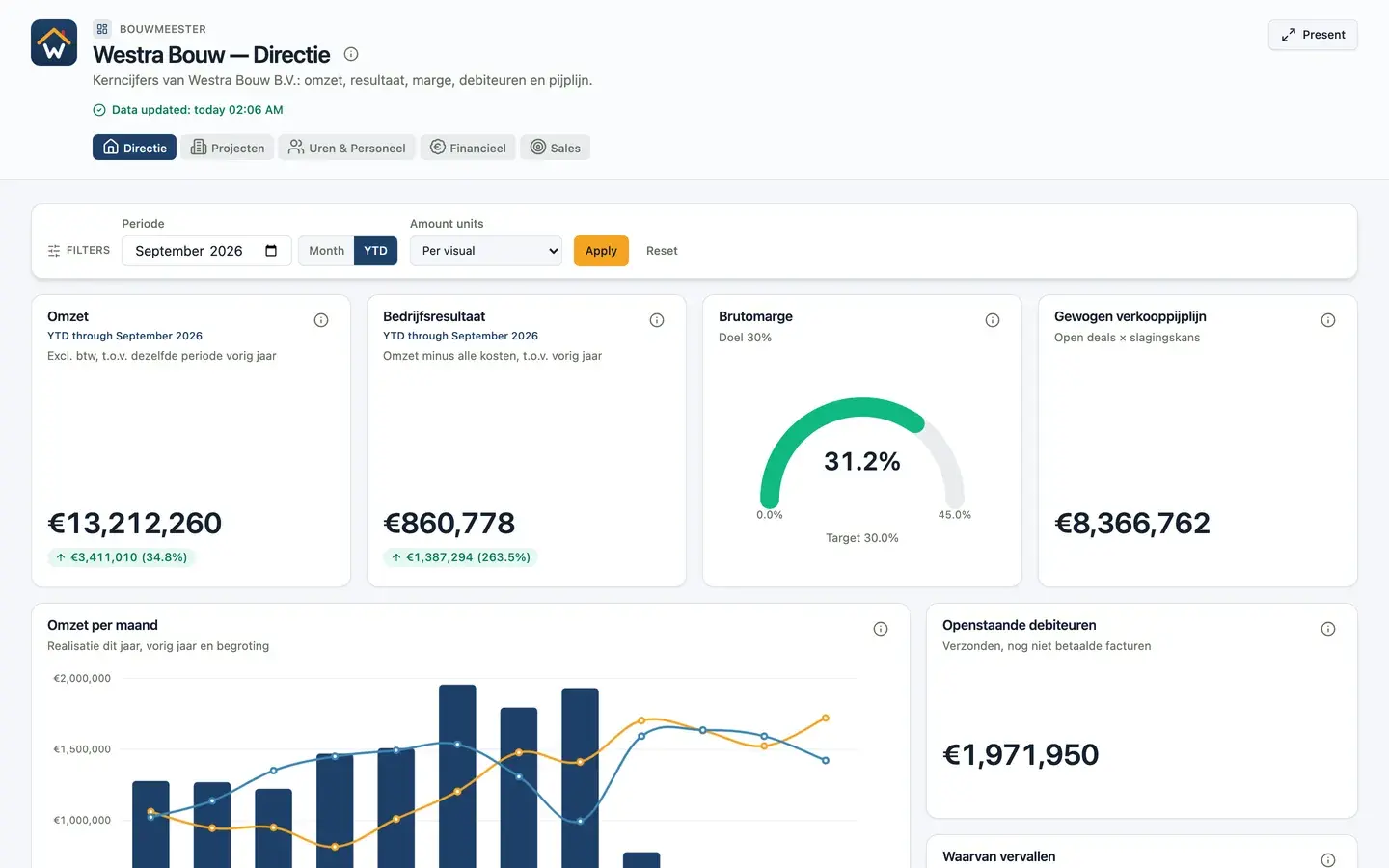
Open the live example- Interactive dashboard with filters, drilldowns and 17 types of visualisation
- Built on synced data from your accounting, CRM and project software
- Fixed definitions for revenue, margin and other key figures
- Your own theme in your house style
- Presentation mode for TV screens and meetings
- Changes through a plain question to the AI agent or in the visual editor
Comparison
Custom dashboard: agency, build it yourself or DigiData
Which route fits depends on how complex your reporting is and whether you have a BI specialist in-house.
| Aspect | Hire a Power BI consultant | Build it yourself in Power BI | DigiData |
|---|---|---|---|
| First version | After intake, data model and build by the consultant | Once you have mastered Power Query and DAX | AI builds a draft from your description as soon as sources and definitions are in place |
| Later changes | A new assignment or extra hours | Change the model and report yourself | Ask the AI agent or adjust it in the visual editor |
| Data connection | A separate connector or custom work | Arrange a connector or export yourself | Ready-made connectors, a fixed amount per connector |
| Cost | Hourly rate plus Power BI licences | Power BI licences and your own time | A fixed monthly amount for platform and connectors, not per user |
| Best choice if | You need a complex model in a Microsoft landscape | You employ your own BI specialist | You want management and operational dashboards without a BI team |
An agency remains the better choice for large data models, extensive self-service BI or reporting that is deeply embedded in Microsoft Fabric.
More dashboards
All about building dashboards with AIFinancial dashboard
Result against budget, DSO and receivables on your accounting data.
KPI dashboard
The key figures you steer on, each with a target or comparison.
Management dashboard
Revenue, result, margin and pipeline in one overview for leadership.
Sales dashboard
Quarterly target, win rate, pipeline and funnel on your CRM data.
Project dashboard
Project margin, order book, hours and progress per project.
Power BI dashboard
What you need for a Power BI dashboard, and the alternative.
What does a custom dashboard cost?
With an agency you pay the hours for intake, data model and build, plus Power BI licences for everyone who views it. With DigiData you pay a fixed monthly amount for the platform and per connector, not per user. Help with setting up the first dashboards is available on request. Current amounts are on the pricing page.
How quickly is a dashboard ready?
Once the data sources and definitions are in place, the AI agent builds the first version directly from a plain description. Total lead time depends mainly on data quality, the definitions you want and the number of sources.
Can DigiData build the dashboard for us?
Yes. On request we build the first set of dashboards with you. After that you can change them yourself, so you do not depend on us for every adjustment.
We already have Power BI reports. Do they have to go?
No. DigiData can keep feeding existing Power BI reports through OData and offer new dashboards directly alongside them. Per report you choose the route that needs the least maintenance.
14 days free · no start-up costs
Tell us which dashboard you need
We show what it looks like on your own data in a 20-minute demo.
